Most app screens are ready long before the real API is. The list view is designed, the detail page is built, and then the team waits for endpoints. A fake API removes that wait. It returns realistic JSON from a real URL, so you can wire up networking code, loading states and layouts today and swap in the production API later.
In this guide you will use the free freetoolza Fake API to get an API key, request sample data, and call it from iOS, Android and the web. Every step has a screenshot.
Why use a fake API instead of hard-coded JSON?
Hard-coding a JSON file in your project is quick, but it skips the parts that usually break: network calls, headers, pagination, errors and slow responses. A fake API behaves like a real server:
- Real HTTP requests: your URLSession, OkHttp or fetch code is the same code you will ship.
- Authentication: you practise sending an API key in a header, just like most production APIs.
- Pagination and limits: you can test infinite scroll, empty pages and rate-limit errors (HTTP 429).
- Stable data: the same request always returns the same items, so screenshots and UI tests stay consistent.
Step 1: Get a free API key
Open the Fake API page and click Generate API key. A key such as ftz_3f9a1c2b7d4e_8b1e6f0a2c9d4e73 appears instantly. No sign-up or email is needed, and the key is remembered in your browser for next time.

You can also create a key from code with POST https://freetoolza.com/wp-json/freetoolza/v1/key. Each key allows 120 requests per minute, which is plenty for development.
Step 2: Pick a topic and a structure format
The API has ten topics that match common app screens: users, products, posts, todos, orders, transactions, movies, recipes, weather and events. Each topic has 100 items and comes in three formats:
| Format | What you get | Best for |
|---|---|---|
simple | Flat fields in a plain array | First prototypes, list screens, learning |
medium | Nested objects inside an envelope with count, page and total | Real screens with detail views and paging |
complex | Deep nesting, related records, meta and links | Testing models, parsing and edge cases |
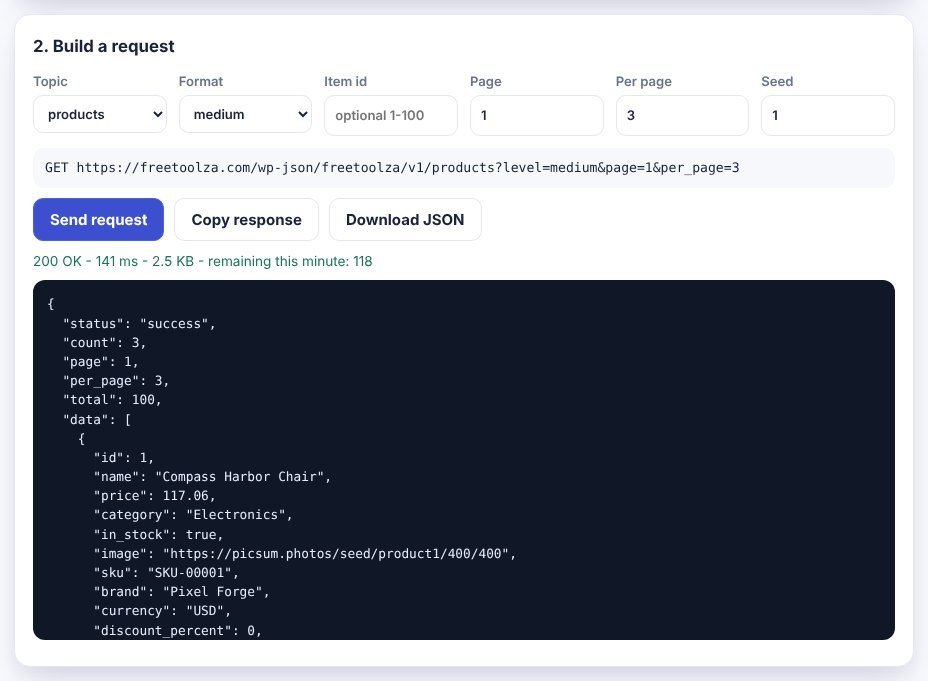
In the playground, choose a topic, a format, the page and how many items per page. The full request URL updates as you change the options. Click Send request to see the live response, its status code, size and how many requests you have left this minute.
Step 3: Copy the code for your platform
The third card turns your request into ready-to-paste code for cURL, JavaScript, Swift, Kotlin, Flutter and Python. Your key and URL are already filled in.
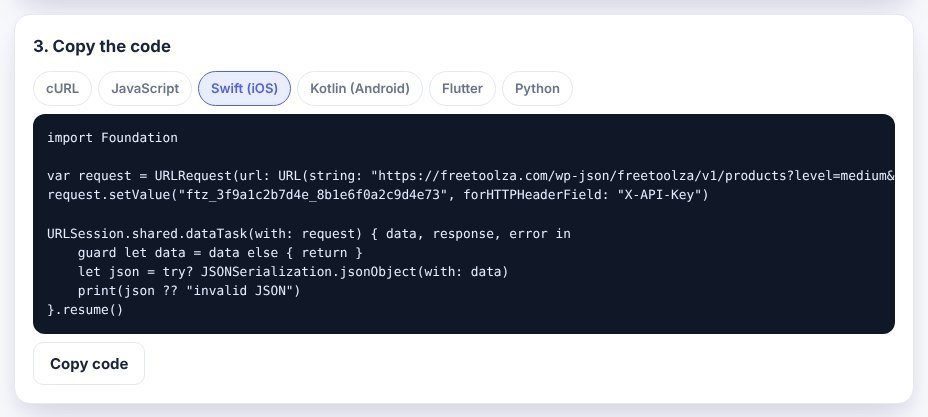
iOS (Swift, async/await)
struct Product: Decodable { let id: Int; let name: String; let price: Double }
struct Page: Decodable { let total: Int; let data: [Product] }

var request = URLRequest(url: URL(string: "https://freetoolza.com/wp-json/freetoolza/v1/products?level=medium&per_page=20")!)
request.setValue("YOUR_API_KEY", forHTTPHeaderField: "X-API-Key")
let (data, _) = try await URLSession.shared.data(for: request)
let page = try JSONDecoder().decode(Page.self, from: data)
Android (Kotlin, OkHttp)
val request = Request.Builder()
    .url("https://freetoolza.com/wp-json/freetoolza/v1/products?level=medium&per_page=20")
    .addHeader("X-API-Key", "YOUR_API_KEY")
    .build()
OkHttpClient().newCall(request).execute().use { response ->
    val json = response.body?.string()
}
Web (JavaScript)
const res = await fetch(
  "https://freetoolza.com/wp-json/freetoolza/v1/products?level=medium&per_page=20",
  { headers: { "X-API-Key": "YOUR_API_KEY" } }
);
const { data, total } = await res.json();
CORS is open, so the web example works directly from a browser, a React or Vue app, or a mobile web view.
Step 4: Test the hard cases
A good prototype also handles the unhappy paths. Use these requests to check your UI:
- Empty or last page: request
?page=11&per_page=10to get an empty list and test your empty state. - Missing key: remove the header to get 401 and test your sign-in or error screen.
- Not found: request
/products/999to get 404. - Rate limit: watch the
X-RateLimit-Remainingheader and handle 429 with a retry. - New data: add
&seed=2to get a different but repeatable set of items.
Tip: build your models from the complex format first. If your parser handles nested objects, optional values and links, switching to the real API later is usually just a change of base URL.
When to use the Demo API instead
If you only need quick, key-free data for a tutorial or a code sandbox, use our Demo REST API. It works like classic placeholder APIs, with posts, comments, albums, photos, todos and users, nested routes such as /posts/1/comments, and fake POST, PUT, PATCH and DELETE responses.
Frequently asked questions
Is the data real?
No. All names, emails and companies are invented and use example domains, and images come from placeholder services. Never send real user data to a fake API.
Can I use it in production?
No. It is built for prototyping, demos and tests, with a limit of 120 requests per minute per key and no uptime guarantee.
Do I need to sign up?
No. Generate a key and start making requests.
Ready to try it? Open the Fake API generator, or check your responses with the JSON Formatter.